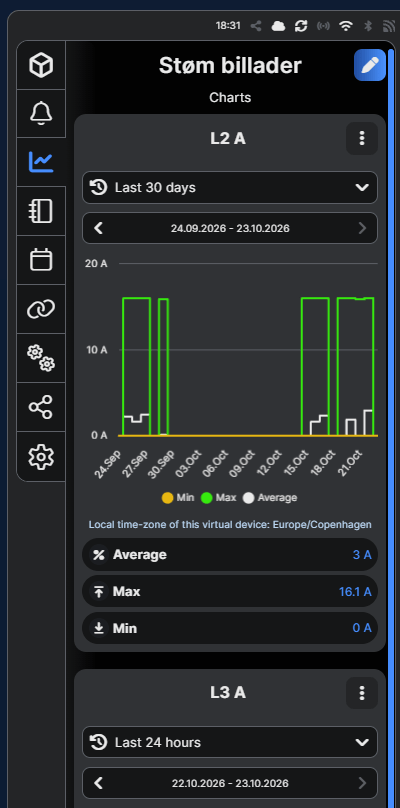
On a Shelly 3EM, the live current measurements are displayed, but they are not stored as historical data in the Shelly Cloud.
This can be solved using a script that updates three virtual Number components (L1, L2, and L3) with the current measurements every 10 seconds.
By enabling data logging for these virtual components, the measurements are stored in the Shelly Cloud, allowing us to view historical current consumption for each phase.
Step 1
Open your Shelly 3EM device.
Click the box icon.
Select the Components tab.
Click Create virtual component.
Select Number as the component type.
Create three Number components, one for each phase (L1, L2, and L3). Start with L1.
Fill in the fields as you prefer.
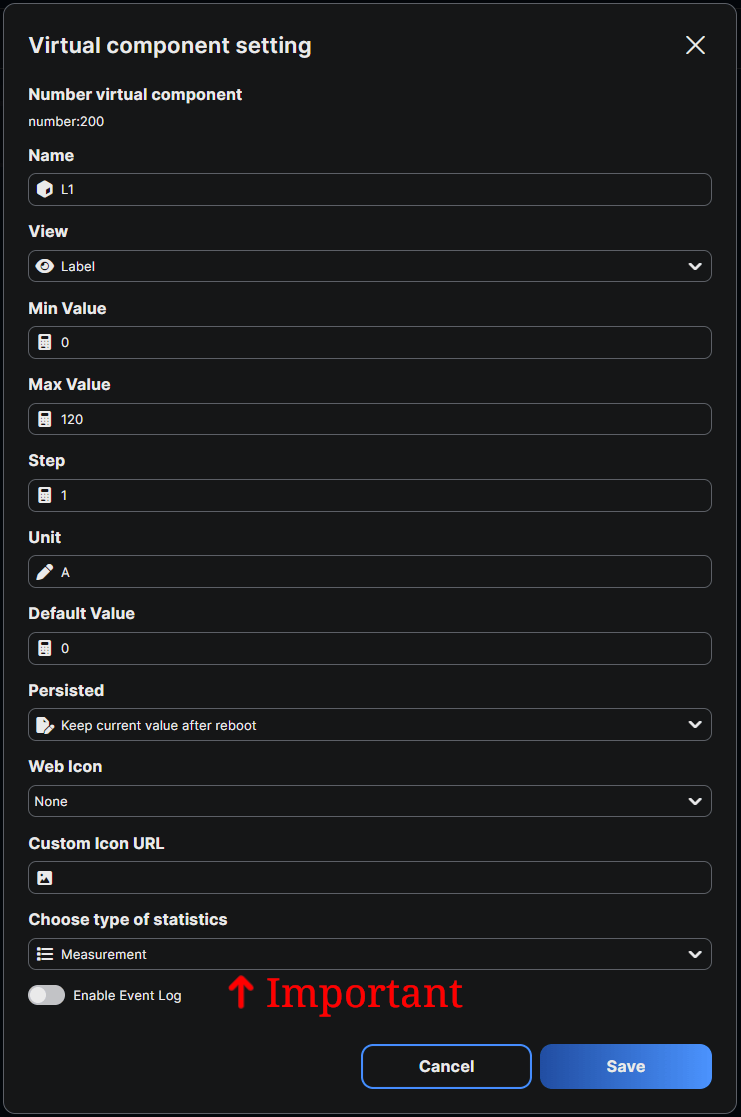
However, make sure to set Choose type of statistics to Measurement, as this is important for logging historical data.
Refer to the example below for guidance.
Step 2
Click the box icon (if you’re not already there).
Select the Groups tab.
Click Create group.
Give the group a name.
Select all three virtual components (L1, L2, and L3).
Enable Extract virtual group as device.
Click Save.
Note: Free users can only extract one virtual group as a separate device.
Step 3
Copy the script below into your Shelly device and run it.
Make sure to enable Run on startup so the script starts automatically whenever the device restarts.
For more information on how to add and run scripts on your Shelly device, Click Here.
// Script to retrieve current and power measurements for each phase and total every minute
// Also writes current values to virtual Number components (IDs 200–203)

function fetchPowerData() {
    Shelly.call('EM.GetStatus', { id: 0 }, function (response) {
        var aCurrent = response.a_current;
        var bCurrent = response.b_current;
        var cCurrent = response.c_current;
        var totalCurrent = response.total_current;

        var aActPower = response.a_act_power;
        var bActPower = response.b_act_power;
        var cActPower = response.c_act_power;
        var totalPower = response.total_act_power;

        // Log current measurements for each phase
        print('Current: [ L1= ' + aCurrent + ' A ] , [ L2= ' + bCurrent + ' A ] , [ L3= ' + cCurrent + ' A ] , [ Total= ' + totalCurrent + ' A ]');

        // Log active power for each phase
        print('Power: [ L1= ' + aActPower + ' W ] , [ L2= ' + bActPower + ' W ] , [ L3= ' + cActPower + ' W ] , [ Total= ' + totalPower + ' W ]');

        // Update virtual Number components (IDs 200–203)
        Shelly.call("Number.Set", { id: 200, value: aCurrent });
        Shelly.call("Number.Set", { id: 201, value: bCurrent });
        Shelly.call("Number.Set", { id: 202, value: cCurrent });
        Shelly.call("Number.Set", { id: 203, value: totalCurrent });
    });
}

// Start monitoring immediately
fetchPowerData();

// Update measurements every minute
Timer.set(10000, true, function() {
    fetchPowerData();
});
Final Notes
You can now find the new virtual device in the same room as your Shelly 3EM.
Open the virtual device and click the graph icon to view the historical current measurements for each phase.